
Discord doesn't let you see the original version of an edited message. It adds a small (edited) tag and nothing else, so a message that said something very different five minutes ago looks perfectly innocent now. To see what a message used to say, you need a logging bot that saved it before the edit.
Quark logs every edit with the text before and after, and Show Edits marks exactly what changed, word by word.
Step 1: log edited messages
If Quark is already logging your Messages category, edits are logged too. If not:
- Add Quark to your server, or open the dashboard if it's already there.
- On the Logging page, set a channel for the Messages category (only staff should be able to read it).
- Check that Edit Message isn't switched off under Individual Log Config.
From now on, every edit posts a Message Edited log with the message before and after, who wrote it and a link to jump to it. Quark can only log what happens while it is in your server, so it can't recover edits from before you added it.
Step 2: see what changed with Show Edits
Reading a long message twice to spot one changed word is slow. Show Edits does it for you.
- Find the Message Edited log.
- Press Show Edits under it.
- Quark replies, only to you, with the message as it is now: added words in bold and
removed words struck through.
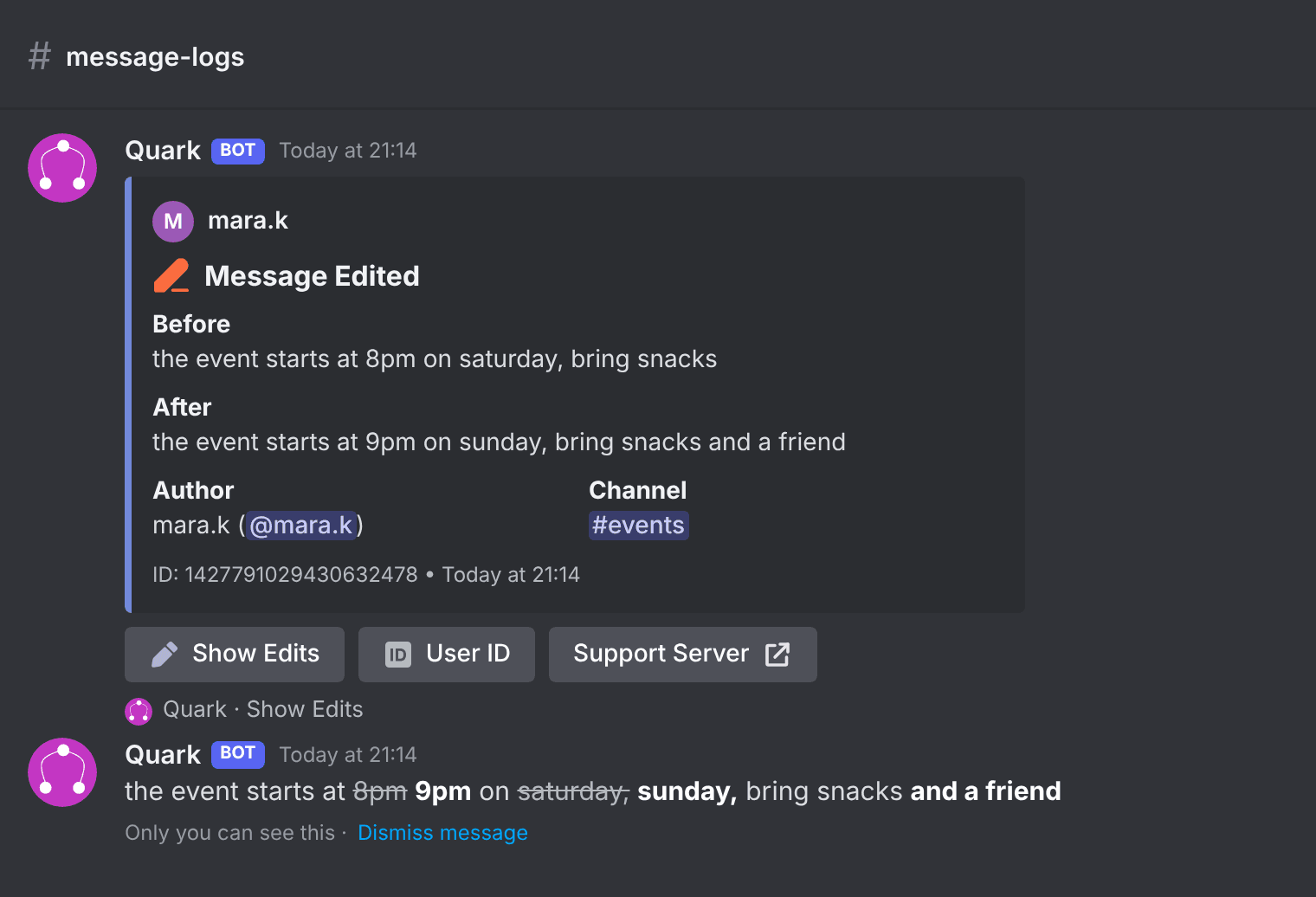
A few things make the comparison easy to read:
- Word by word. Long unchanged stretches are cut to ten words either side of each change.
- Nobody is pinged. Mentions, links and custom emojis stay whole, and no one is notified.
- Long messages too. If the log only holds the start of a long message, Quark fetches the rest.
For older edit logs
Show Edits used to appear only on edits of more than one line. For a log posted before the change, right-click the log (or long-press on a phone) and choose Apps → Show edits. It does the same thing.
Tips for catching edited messages
- Find them again. The Log Viewer on quark.bot puts your logs on the web, where you can filter by log type and member instead of scrolling a channel.
- Get told about edits that matter. An automation can alert your mods when an edited message contains a word from a list, such as a scam link added after the fact.
- Keep deleted messages too. Edits and deletes are logged in the same Messages category. Quark also keeps deleted images and files; see the Discord message logger.
FAQ
Can you see the original of an edited message on Discord?
Not in Discord itself: it only marks the message as (edited). A logging bot such as Quark records the message before and after each edit, in a Message Edited log your moderators can read.
Can I see edits made before Quark was added?
No. A bot can only log what happens while it is in the server, so edits from before Quark joined can't be recovered.
Does Show Edits ping people mentioned in the message?
No. Mentions, links and custom emojis are kept whole, and nobody is notified.
Who can see the comparison?
The comparison is a reply only you can see. Anyone who can see the log can press Show Edits, and the Apps menu command is shown by default to members with Manage Messages.
Read more about Show Edits, or set up message logging from scratch with the setup guide.