Auto moderation on Discord means letting a bot spot the things your moderators would want to know about, and act on them, without someone watching every channel. With Quark Automations you write a rule as one sentence: when something is logged, and only if something is true, then do this.
This guide sets up your first rule in about five minutes, then gives you a handful of rules worth copying.
What you need
- Quark in your server. If it isn't yet, add Quark and follow the setup guide.
- Access to the dashboard for that server.
- A channel your moderators read, such as
#mod-alerts.
Every plan can make rules. The free plan gets one, which is plenty to start with.
How a rule works
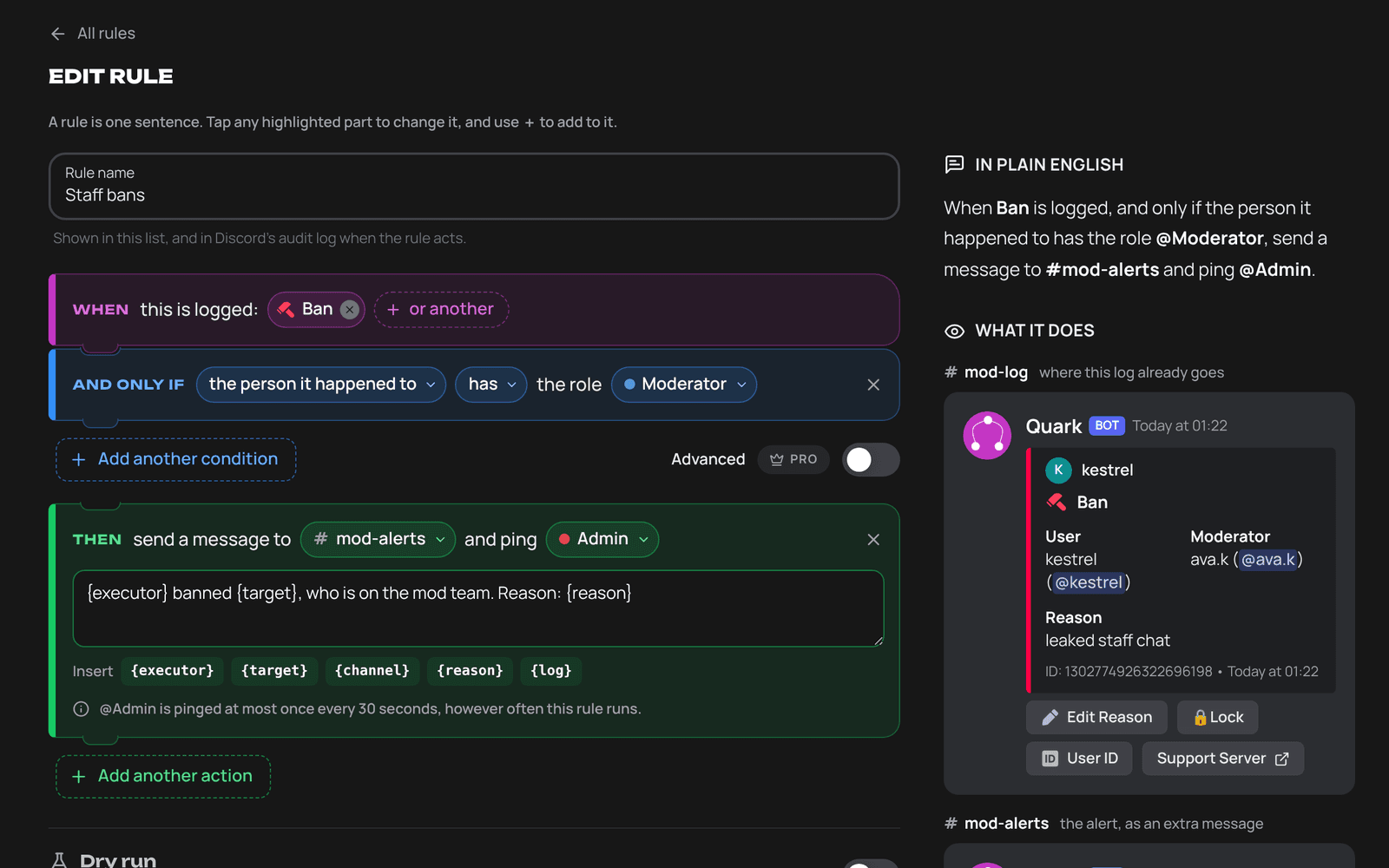
A rule is built from three parts, and the builder reads it back to you in plain English as you go.
| Part | What it does | Examples |
|---|---|---|
| When | The logs the rule watches | Ban, Member Join, Message Deleted, or a whole category |
| And only if | Conditions that must all be true | Someone has a role, a bot did it, the account is new, it keeps happening |
| Then | Up to four actions, in order | Alert a channel, add a notice to the log, reply, react, time out, kick or ban |
Because a rule runs on Quark's logs rather than only on messages, it can react to things Discord's own AutoMod never sees: bans, role changes, joins, voice, threads and channel edits.
Tutorial: alert your mods when a brand-new account joins
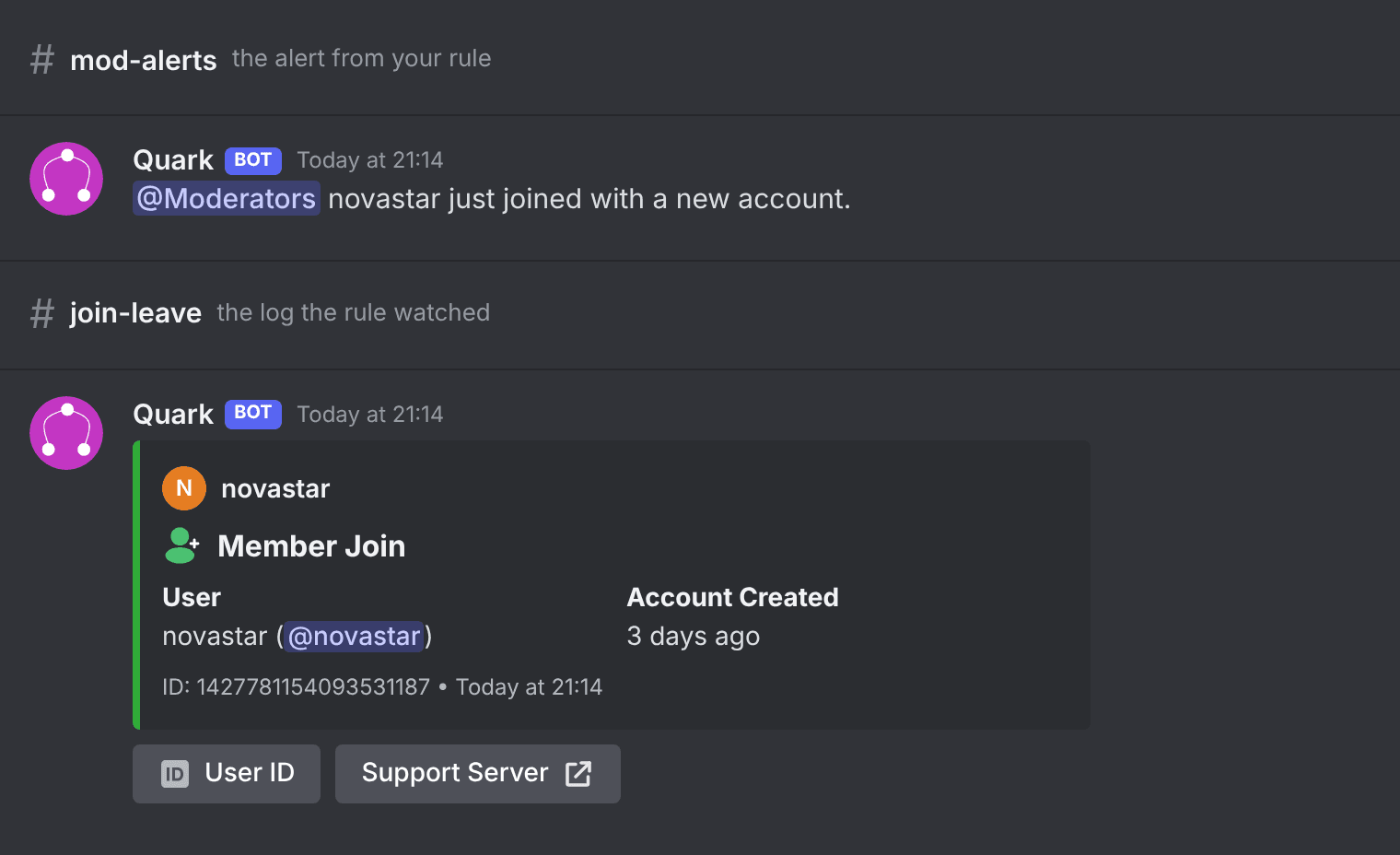
New accounts are where most raids and scam accounts come from. This rule tells your mods about every join from an account under a week old.
- Open the dashboard, pick your server and choose Automations in the sidebar.
- Press New rule.
- Under Or start from an idea, choose the idea for an account under 7 days old joining. It opens in the builder with the blanks left for you.
- When is already set to Member Join. Check that And only if reads the account is new.
- Under Then, pick the channel for the alert, such as
#mod-alerts, and the one role to ping, such as@Moderators. Write the alert text, for example:{target} just joined with a new account. - Look at the side panel. In plain English reads the rule back, and What it does draws the alert as it will look in Discord.
- Press Try it to run the rule against sample logs and see which would set it off.
- Switch Dry run on for the first day, then press Save rule.
With dry run on, the rule counts how often it would have acted and does nothing else. When the count looks right, switch dry run off.
Five rules worth copying
All five start from ideas in the builder, and all five work on every plan.
- Mass deletes. Alert a channel when one member has 5 messages deleted in 10 minutes. A good early sign of someone wiping their tracks.
- Staff bans. Tell a channel and ping an admin when someone with your staff role is banned.
- Webhooks and bots. Alert when a webhook is created or a bot is added, two things that are rarely harmless when nobody expected them.
- Join raids. Alert when 10 members join in a minute. The same rule can also lock a channel you choose.
- Scam links. Flag a log whose message holds a known scam link. The rule can also time the poster out for an hour. See the scam link blocker for how Quark's link lists work.
Careful by design
A bot that can ban people needs guard rails. Quark's are built in, on every plan:
- A rule never acts on the server owner, on Quark, or on anyone whose highest role is level with or above Quark's.
- Alerts ping only the one role you choose, never
@everyoneor@here. - Every rule has hourly limits, and so does the server as a whole. Past a limit, actions wait until the next hour.
- Only someone with the matching Discord permission, such as Ban Members, can save a rule that bans. A rule acts with the permissions of whoever last saved it, checked at the moment it acts.
- Alerts and moderation are recorded as a Rule Action log in your Quark Events channel, so you can always see what a rule did and why.
What each plan gets
| Free | Pro Lite | Quark Pro | |
|---|---|---|---|
| Rules | 1 | 3 | 25 |
| Alerts, notices, copies, replies, reactions, holding a log back | Yes | Yes | Yes |
| Lists of words, including Quark's | Yes | Yes | Yes |
| Changing a log's colour | No | Yes | Yes |
| Moderation actions | Yes | Yes | Yes |
| Advanced conditions | No | No | Yes |
| Trying a rule on your own logs | No | No | Yes |
Nothing is deleted when a plan ends. A rule over the plan's limit, or one that needs a higher plan, is marked Parked and picks up again when the plan is back. See pricing for the plans.
FAQ
Is Quark Automations free?
Yes. Every server gets one rule for free, and it can use every action, timeouts, kicks and bans included. Only changing a log's colour needs Pro Lite. Pro Lite raises that to 3 rules and Quark Pro to 25.
How is this different from Discord's AutoMod?
Discord's AutoMod checks messages before they are posted. Quark's rules run on everything Quark logs: bans, role changes, voice, threads, joins and more. The two work well side by side.
Can a rule ban the server owner or a moderator by mistake?
No. A rule never acts on the server owner, on Quark, or on a member whose highest role is level with or above Quark's. Every rule also has hourly limits.
Can I test a rule before it does anything?
Yes. Try it runs the rule against sample logs, and Dry run lets a live rule count how often it would have acted without doing anything.
Ready to write your first rule? Open Automations in the dashboard, or read the full guide to automations for every condition and action.