Every server reads its logs differently. A busy community wants a log that takes one line, a staff team wants every ID and timestamp, and someone feeding logs into their own bot wants JSON. Log Formats in Quark lets you choose how your Discord log messages look, from a one-click switch to a format you build yourself.
Quark's own formats
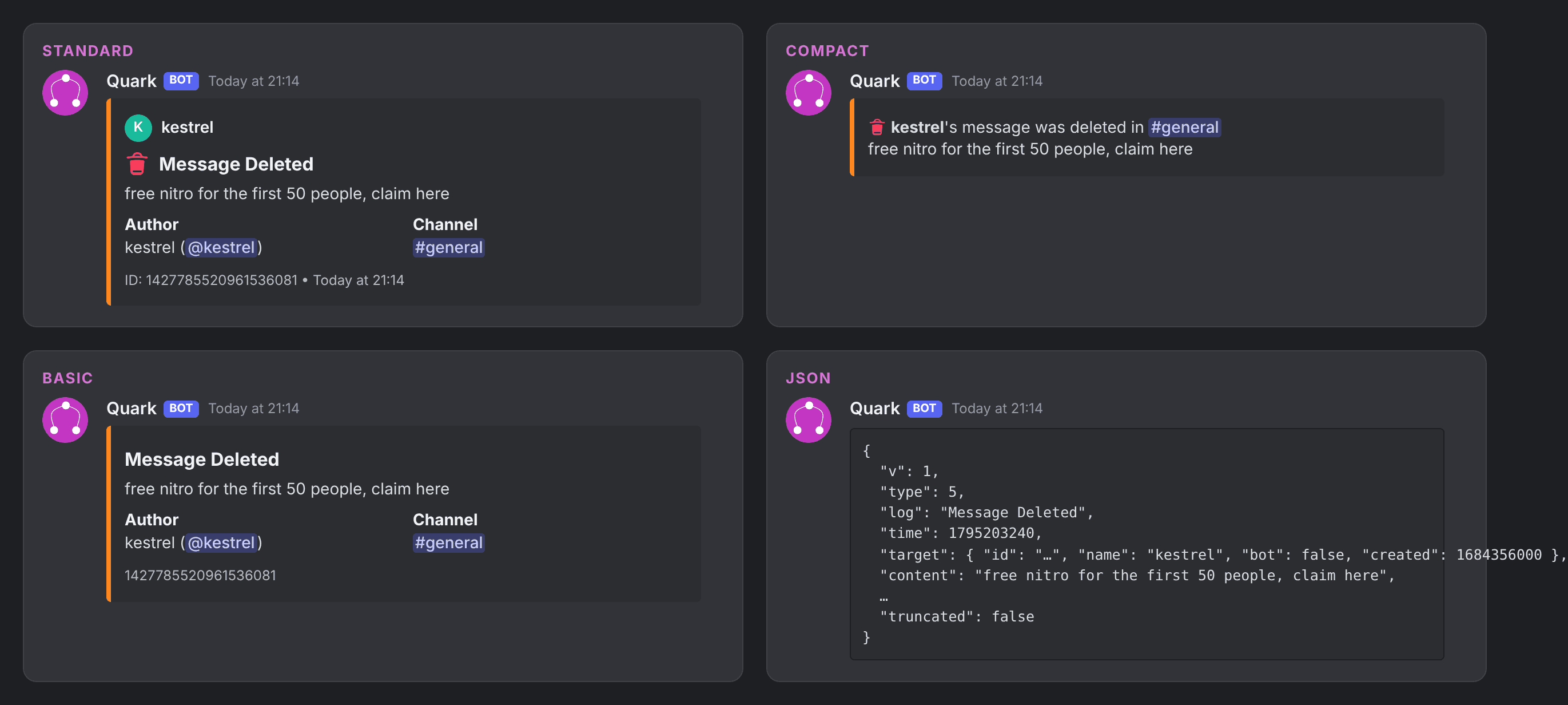
Open Log Formats in the dashboard sidebar to see them all. Each one is drawn on a real log before you choose it.
| Format | What it looks like | Plan |
|---|---|---|
| Standard | Quark's embed, with a colour for each kind of log. Every server starts here | Every plan |
| Standard (no embed) | The same information as a plain message | Every plan |
| Compact | A small embed, one or two lines per log, for busy channels | Every plan |
| Compact (no embed) | One or two lines of plain text, no buttons | Every plan |
| Basic | Just the facts: who, what, where and why, with no icons | Every plan |
| Basic (no embed) | Basic as plain text | Every plan |
| Detailed | Standard plus every extra detail: IDs, account ages, exact times | Every plan |
| JSON | Each log as JSON in a code block, for another bot to read | Every plan |
| Components | Laid out with Discord's newer components, buttons inside the box | Every plan |
| Image cards | Each log drawn as a picture card | Quark Pro |
Switch format in one click
- Open Log Formats in the dashboard.
- Press See every log on a format to check how it looks on each kind of log Quark sends.
- Press Use this format. It applies at once, and Undo takes it back.
Tutorial: build your own log format
When none of the built-in formats is quite right, make your own. This example builds a staff-room format that spoilers deleted messages and adds the message ID and a link button.
- On Log Formats, press Create a format. Give it a name and choose what it Starts from, for example Standard.
- Pick Message Deleted from the log menu and press Change something.
- Choose Hide or spoiler something and set the message text to Spoiler. Moderators now choose when to read it.
- Choose Show extra information and add Message ID and Sent.
- Choose Change the buttons and add a link button. Jump to message is built in, or link to your own tools with the member's ID in the address.
- To change something on every log, pick All logs at once at the end of the log menu. A setting for a single log wins over it.
- Check the two previews. What Quark posts now sits beside what your format will post, and every change is listed as a sentence you can edit or remove.
- Press Save format, then go to All formats and press Use this format.
You can also write your own title, footer and up to four lines of text, with {{target}}, {{executor}}, {{channel}} and {{reason}} filled in from the log.
Advanced templates, with Quark Pro
With Quark Pro, switch on Advanced for any log and write it as a template, with tokens, filters and conditions:
{{#if reason}}{{reason}}{{else}}No reason given{{/if}}
{{content | truncate 200}}
{{target.created | time R}}
Checks points out mistakes before you save, such as an unknown token or an {{#if}} that's never closed. If a template still fails, or makes something too big for Discord, that log is posted as Standard. No log is lost to a format.
Advanced also has a drag-and-drop editor for the Components layout (boxes, galleries, rows of buttons and a menu of actions) and a layer editor for Image logs.
Share a format with a link
Press Share on a format to get a link like quark.bot/f/…. It carries the layout, wording, colours and buttons, and nothing from your server: no names, channels, roles, members or logs.
To use someone else's, press Add from a link and paste it. You see a preview first, including where any link buttons lead, and you get your own copy to edit.
What each plan gets
| Free | Pro Lite | Quark Pro | |
|---|---|---|---|
| Quark's own formats (except Image cards) | Yes | Yes | Yes |
| Build, share and add formats | Yes | Yes | Yes |
| Post logs in a format you made | No | Yes | Yes |
| Logs a format can change one by one | None | 10 | All |
| Advanced templates, Image layout | No | No | Yes |
A Top.gg vote unlocks Pro Lite for 24 hours on a server under 1,000 members, so you can try your own format for free. See pricing for the rest.
FAQ
Can I change how Discord log messages look for free?
Yes. All of Quark's own formats except Image cards are free on every server, and anyone can build, share and add a format. Posting your logs in a format you made yourself needs Pro Lite or Quark Pro.
Can I change just one log, such as bans?
Yes. A format changes logs one by one, so you can change the Ban log and leave everything else as it is. Pro Lite can change 10 logs on their own, Quark Pro all of them, and anything under All logs at once does not count towards the 10.
What happens if my format breaks a log?
Quark posts that log in the Standard format instead, so no log is ever lost to a format.
Can another bot read my logs?
Yes. The JSON format posts each log as one JSON object in a code block, with the same keys every time, for another bot to read.
See every format side by side on the Log Formats page, or read the full guide to log formats. If you want your logs to act on what they report, the next step is Quark Automations.